Asset - Maps Component
What is an Asset – Maps Component?
An Asset – Map component allows submitters to select an Asset from pins on an Embedded Map within the form. This is particularly helpful for Mobile Workers, or submitters who want to select certain assets, such as Bus Stops or other pieces of infrastructure.
If you would prefer the submitter to select an asset via a dropdown list, please refer to this guide:
How do I configure an Asset – Maps Component?
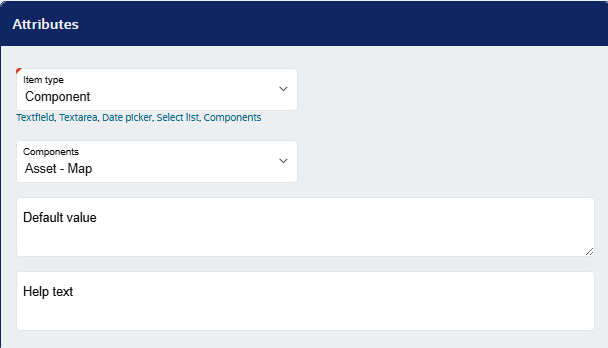
Firstly, create a new item on the form in which you want the Asset – Maps component. Next, select ‘Component’ as the item type, and ‘Asset – Maps as the Component:
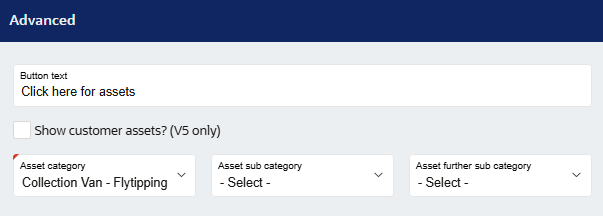
Configure the button text, and select Asset category, sub-category and further sub-category as required and the relevant assets will be pulled through for selection.
Next, save and publish the form.
On the page where the Asset - Map is, a map view with the assets will be shown as per the configuration.
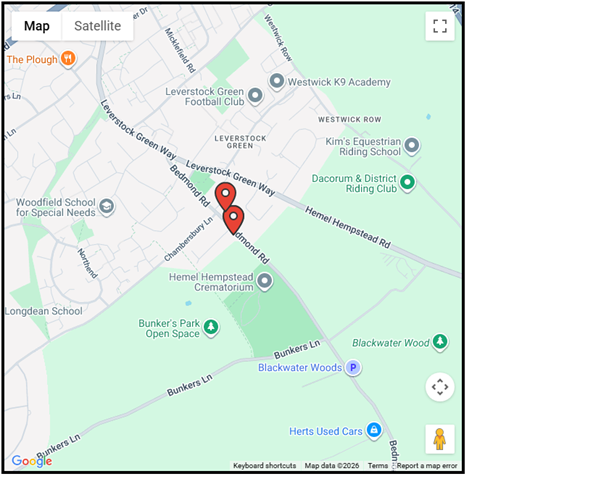
When an asset is selected, text appears with the asset’s name, category, and more.
Was this article helpful?
That’s Great!
Thank you for your feedback
Sorry! We couldn't be helpful
Thank you for your feedback
Feedback sent
We appreciate your effort and will try to fix the article