IMPORTANT INFORMATION: Please note that Regex does not work on forms used on the mobile app.Configuring Regular Expressions
Setting up Regex Validation
Regular Expression (Regex) validation can be applied to Textfield and Textarea form items and is supported across both the Admin Portal and the Customer Portal.
To enable Regex validation, open the form item configuration and navigate to the Validation section. Set the Validation Type to Regular Expression.
Once selected, enter the required regular expression into the Regular expression field. You must also provide an Error message, which will be displayed to the user when their input does not meet the defined validation criteria.
An example of this configuration is shown below.
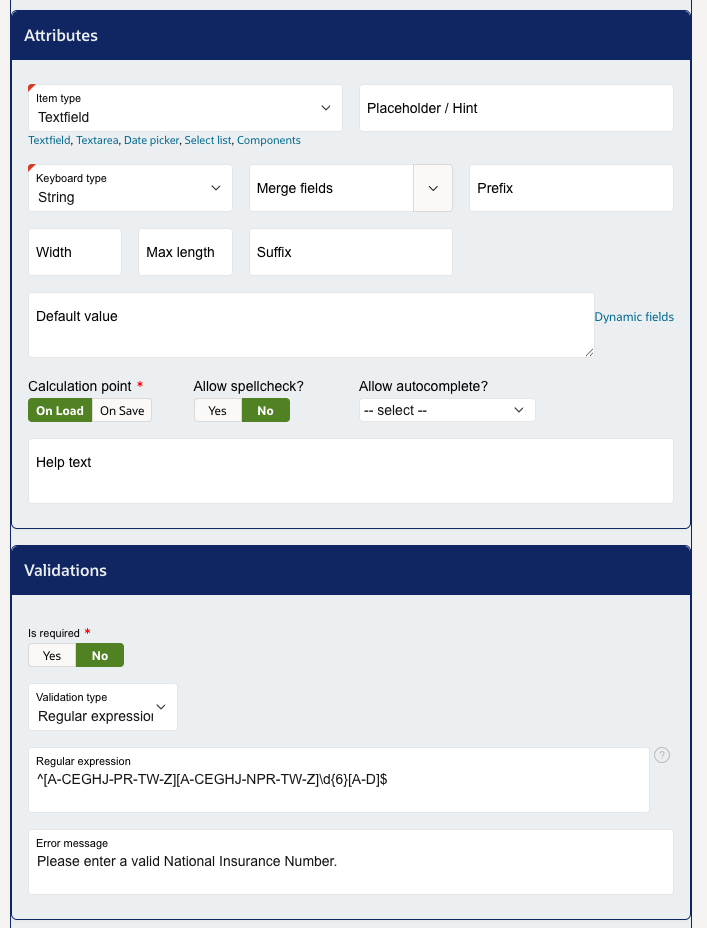
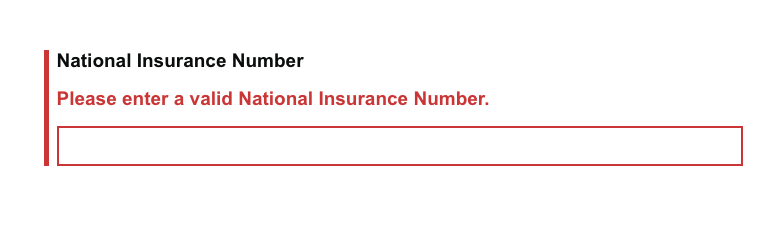
Once selected, the regular expression will need to be placed into the new 'Regular expression' box. A message will also need to be put into the 'Error message' input box. This error message will be displayed when the users input is not considered valid by the Regex. See the example below of what this looks like.
Testing Regular Expression
We recommend that all regex is tested on one of the following websites to ensure that your inputs are validated correctly.
Please note: If the page does not progress when a regex is set on a form item then it indicated an issue with the Regex itself.
Regex Examples
UK Postcode Validation
This Regex is used to validate that an inputted postcode is in the expected postcode format.
^([A-Z]{1,2}\d[A-Z\d]? ?\d[A-Z]{2}|GIR ?0A{2})$National Insurance Number Validation
This Regex is used to validate that an inputted postcode is in the expected postcode format.
^[A-CEGHJ-PR-TW-Z][A-CEGHJ-NPR-TW-Z]\d{6}[A-D]$UK Mobile Number Validation
This Regex is used to validate that an inputted postcode is in the expected postcode format.
^(((\+44\s?\d{4}|\(?0\d{4}\)?)\s?\d{3}\s?\d{3})|((\+44\s?\d{3}|\(?0\d{3}\)?)\s?\d{3}\s?\d{4})|((\+44\s?\d{2}|\(?0\d{2}\)?)\s?\d{4}\s?\d{4}))(\s?\#(\d{4}|\d{3}))?$Was this article helpful?
That’s Great!
Thank you for your feedback
Sorry! We couldn't be helpful
Thank you for your feedback
Feedback sent
We appreciate your effort and will try to fix the article