Introduction
About this guide
This guide explains how to create a task form, assign it to a task type, and make it available to Mobile Workers from the task actions menu.
Creating the Form
Configuring Task Forms
Before you begin, make sure you have access to Administration, permission to use Forms Builder, and an existing task type that the form can be linked to.
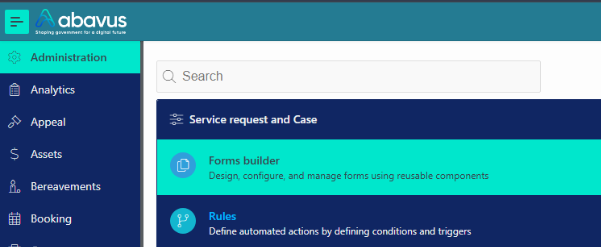
To create a task form, go to Administration > Service Request and Case > Forms Builder:
Create the form that you want to link to the task. It is recommended that you store this form in a different catalogue from the customer form.
If you need help creating a form, see the Forms Builder User Guide.
Assigning the Form
Linking the Form to the Task
Once your form has been created, go to Administration > Tasks > Type.
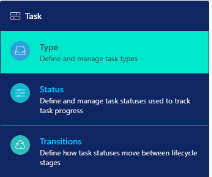
Find the task type that you want to add the task form onto and select the task type.
Next, add the catalogue and form to the task type configuration:
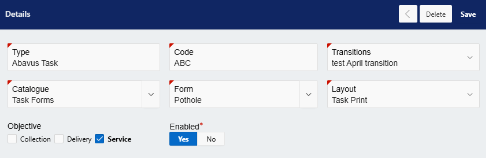
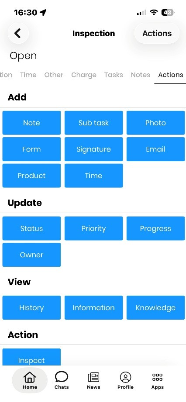
Click Save. When Mobile Workers access a task, they can add a task form from Actions > Add Form.
Was this article helpful?
That’s Great!
Thank you for your feedback
Sorry! We couldn't be helpful
Thank you for your feedback
Feedback sent
We appreciate your effort and will try to fix the article