Introduction
About this guide
This guide explains how to enable a setting within MobileOps that allows the logged-in user to automatically be assigned as an Owner when they add tasks from MobileOps.
When this setting is enabled, any new Task created from MobileOps will default the Task Owner to the user currently logged in to the mobile app.
Effective Applications
This setting should be enabled by operatives who need to become the default owner of Tasks they create from MobileOps.
For example, if an operative creates a Task while working on-site, enabling this setting ensures that the Task is automatically assigned to them as the owner.
Enabling Default Ownership upon Task Creation
Once logged in to MobileOps, navigate to the Profile screen.
From here, open Profile & Settings.
Locate the setting ‘Assign logged in user as the default task owner’ and enable the setting, as shown below:
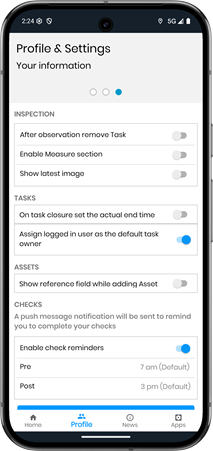
Once the setting is enabled, any tasks that the operative adds will assign the logged-in user as the default Task Owner. This overrides any default owner settings done on the backend admin portal.
The default owner is applied at the point the Task is created from the app.
Additional Information
This is a user-level setting, so each operative must enable it individually to experience this feature.
The setting applies only to Tasks added from the MobileOps app.
The setting only affects new Tasks created after the option has been enabled.
Was this article helpful?
That’s Great!
Thank you for your feedback
Sorry! We couldn't be helpful
Thank you for your feedback
Feedback sent
We appreciate your effort and will try to fix the article