Introduction
About this guide
This guide has been written to explain the function of Page Visibility, and how it can be used effectively to streamline the form submitting process.
Purpose
The purpose of Page Visibility is to allow submitters to only be able to continue to a page if certain conditions are met. This could include exact text for textfields, an answer selected on a select list, or multiple different conditions. On the pages of a form, you can configure Page Visibility here:
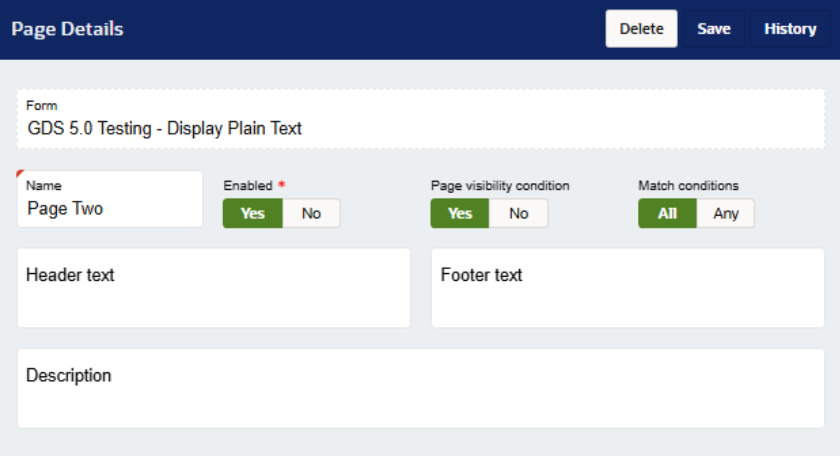
The Match Conditions settings change the behaviour of the Page Visibility as described below:
All – All page visibility conditions configured must be met for the submitter to proceed to this page
Any – One or more of the configured page visibility conditions must be met for the page to be shown to the submitter.
Intended Behaviour
Below are a few examples of page visibility, and how this works in specific scenarios:
If page visibility is NOT met, the page is skipped, and the next page where conditions are met (or where there is no page visibility at all). If there are no pages to proceed to, the SR is submitted.
If page visibility is enabled, and then the conditions are met, the submitter enters information on the next page, and then the submitter goes back and changes their answer to not meet the conditions of the page, the information is NOT saved. This ensures that no erroneous information is entered, and that pages that should have no data have no data.
Configuration
To configure what conditions are to be met, click on the ‘add’ button on the Page Visibility Conditions section of the Page settings:

Next, a pop-up box will appear. On the ‘Questions’ select list, you can choose a question and answer for the page visibility condition. For example, I only want this page to appear when the customer selects ‘Yes’ on a select list. Then, click on ‘add’ and ‘save’ on top of the page settings.
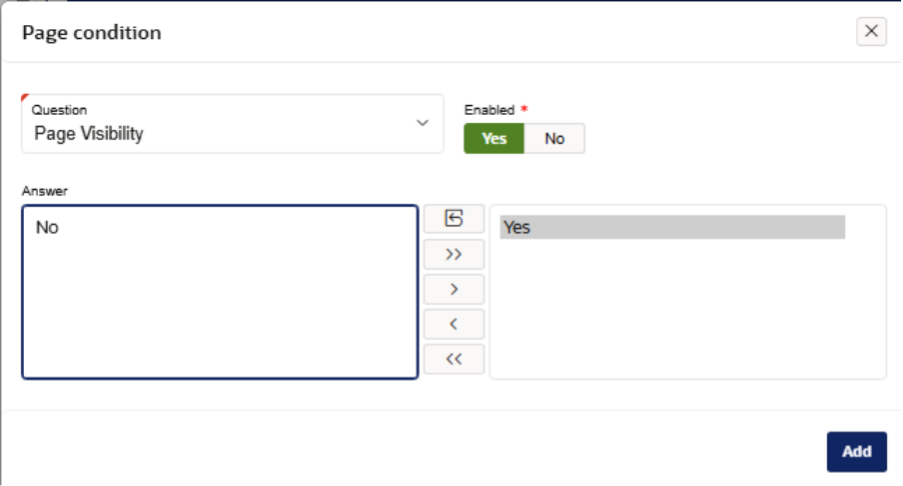
You may want to have a separate page depending on the submitter’s answer. For example, if the questions answered on a Blue Badge Application deems the submitter unqualified for a Blue Badge, the page visibility can be an effective way to redirect the submitter to a ‘You do not qualify’ page.
If you have any other questions regarding page visibility and it's use cases, please contact isupport@abavus.co.uk .
Was this article helpful?
That’s Great!
Thank you for your feedback
Sorry! We couldn't be helpful
Thank you for your feedback
Feedback sent
We appreciate your effort and will try to fix the article