IMPORTANT INFORMATION: Please note that calculative fields do not work on forms used on the mobile app.
Configuring Calculative Fields
Creating Calculative Fields
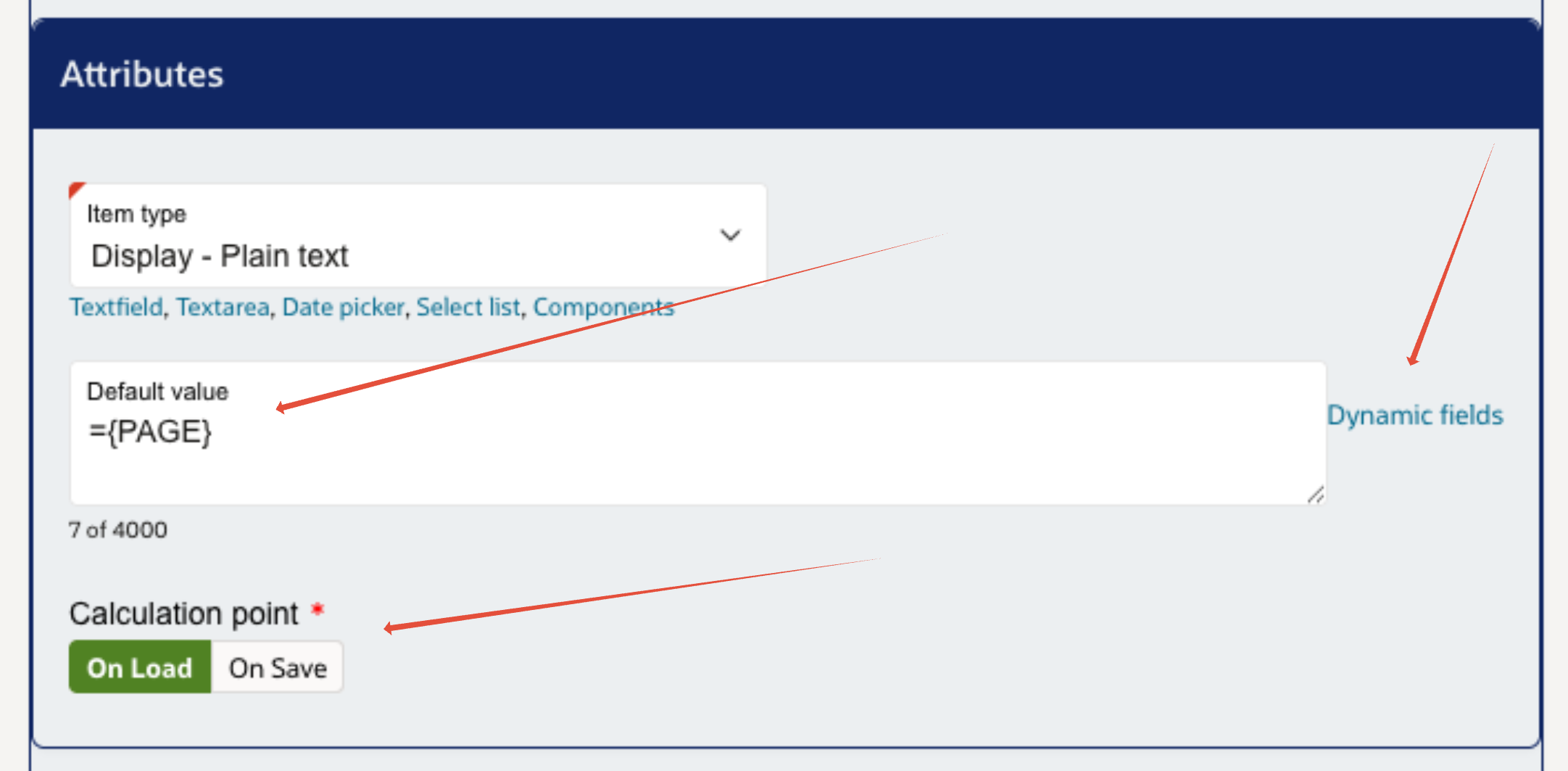
The system has a set of pre-populated list of dynamic fields which can be used as part of Calculative fields. These can be viewed by selecting the "Dynamic Fields" button next to the Default Value box for easy access.
IMPORTANT INFORMATION: Any dynamic within this list contains (Web only) in the name will only work on the admin portal.
Any calculated value will need to be entered into the 'Default value' field for the item for the system to carry out the calculation.
There are two points where the calculation of dynamic fields can occur when accessing a page. These can be controlled individually for each form item:
- On Load - The calculation is preformed as soon as the page is loaded for the first time.
- On Save - The calculation is preformed either when moving to another page on the form. This will still work on the last page of a form.
Page Item Referencing
You can reference any page item using {[ITEM_CODE]} where [ITEM] should be replaced with actual item code. Using the page reference on a select list will return the selected options code. Component form items will only return a blank string when referencing.
You can concatenate (join) multiple text strings together using '||'. For example, you can set up 2 form items one for a first name and another for a second name. To join them together, use the follow:
= "||{FIRST_NAME}||" "||{LAST_NAME}||"This outputs the both the First and Last names together into a single string on a form item.
Calculative Fields Examples
Custom PL/SQL Formulas
Below are many ways that PL/SQL can be used in Forms to help automate certain functions. Below are some examples of some formulas that you can use on a form.
1. Populate value in one item from another item.
Take item code value
={REC_GREEN_BOX}
2. To take an answer value from an item and display text in another item based on the answer value selected using case statement.
So if answer Yes then add text 'You have selected Recycling Box - Green (Paper & Glass)', all other answers values display text 'You have selected no Recycling Box - Green (Paper & Glass'.
=CASE WHEN {REC_GREEN_BOX} = 'Y' THEN 'You have selected Recycling Box - Green (Paper & Glass)' ELSE 'You have selected no Recycling Box - Green (Paper & Glass' END
3. To take an answer value from an item and display text in another item based on the answer value selected using case statement.
=CASE WHEN {REC_GREEN_BOX} = 'Y' THEN 'You have selected Recycling Box - Green (Paper & Glass)'WHEN {REC_GREEN_BOX} = 'N' THEN 'You have selected no Recycling Box - Green (Paper & Glass)' ELSE 'You have made no selections' END
4. To take 2 answer values and to add text around these in a Display text item.
='I declare there are no funds remaining in the estate of the late '||{REFERENCE}||' and therefore ask that the sum outstanding on the rent account of £'||{AMOUNT}||' be written off.'
5. Calculate date from system date (current date).
=TO_CHAR(SYSDATE, 'YYYY-MM-DD') - populates as YYYY-MM-DD format
=TO_CHAR(SYSDATE-6, 'YYYY-MM-DD') - takes system date and minuses 6 days, populates as YYYY-MM-DD format
6. Date conversion from one item to another.
=TO_CHAR(TO_DATE({ITEM_CODE},'YYYY-MM-DD'), 'YYYY-MM-DD"T"HH:MI:SS"Z"') - so converts string into date and then into required date format.
7. Take a string and take then certain characters.
=SUBSTR('Active Subscription - 09/05/2021 - 1 - Container(s)', -17, 1)
Counts 17 characters from the right and then takes 1 characters from that position. So will populate as 1.
8. If one value of an item is equal to a specific value populate the message with a value of another field.
=CASE WHEN {ECHO_GWACTIVE} = '1' THEN ' '||{ECHO_SUBNEWDATE}||' ' ELSE 'You have a subscription which will be restarted from tomorrows date' END
Gives message 'Active subscription expires on - 09/05/2021 - Quantity of garden bin subscription(s) - 3.' which is the value of field ECHO_SUBNEWDATE.
9. Adds 2 hours to the current time - divide by 24 for each hour needed.
=TO_CHAR(SYSTIMESTAMP+ 2/24,'HH24:MI:SS')
10. Calculate next date for a day of the week.
=NEXT_DAY(SYSDATE, 'MONDAY') or =NEXT_DAY(SYSDATE +7, 'MONDAY') (when adding on another week)
11. Get current day of the week.
=to_char(SYSDATE, 'DY') - there are different abbreviations available for days, time, etc.
12. Where value of one item = something then display value of another item.
=CASE WHEN {CURRENT_DAY} = 'MON' THEN ''||{NEXT}||'' WHEN {CURRENT_DAY} = 'TUE' THEN ''||{NEXT}||'' WHEN {CURRENT_DAY} = 'WED' THEN ''||{NEXT}||'' WHEN {CURRENT_DAY} = 'THU' THEN ''||{NEXT}||'' ELSE ''||{NEXT_1}||'' END
13. Left Trim - will trim the characters from the left hand side with the.
=LTRIM({ITEM_CODE}, 3)
where ITEM_CODE value = 'Tested' will equal 'ted'
14. Add items from several fields if No values can be selected.
=({ECHO_QUANTITY_RENEW}*57.20) + ({ECHO_QUANTITY_NEW}*57.20)
so will multiply (ITEM_CODE) values by 57.20 and add together.
15. Add items from several fields if No values are selected from some fields.
=((NVL({ECHO_QUANTITY_RENEW},0)*57.20) + (NVL({ECHO_QUANTITY_NEW},0)*57.20) + (NVL({ECHO_QUANTITY_RENEW_A},0)*57.20) +
(NVL({ECHO_QUANTITY_PACKS},0)*28.30) + (NVL({ECHO_QUANTITY_NEW_A},0)*57.20))
so where item (ITEM_CODE) is selected, it will multiple value by 57.20 but where there is no value selected it will denote '0'.
16. Add 12 months to a string and minus one day and convert into date format as needed.
=TO_CHAR(ADD_MONTHS(TO_DATE({START_DAY_WEEK},'DD/MM/YYYY'),12) -1,'DD/MM/YYYY')
so where item code is given, convert to date, add 12 months and then minus 1 day i.e. if today's date is 'START_DAY_WEEK' value of 14/06/2021 then add 12 months and then minus 1 day to five 13/06/2022.
17. Look for a specific string within a text and then give a value.
=CASE WHEN {P_DEC_AMOUNT} LIKE '%(1 Garden Bin) - 1%' THEN '1'
WHEN {P_DEC_AMOUNT} LIKE '%(1 Garden Bin) - 2%' THEN '2'
WHEN {P_DEC_AMOUNT} LIKE '%(1 Garden Bin) - 3%' THEN '3'
WHEN {P_DEC_AMOUNT} LIKE '%(1 Garden Bin) - 4%' THEN '4'
WHEN {P_DEC_AMOUNT} LIKE '%(1 Garden Bin) - 5%' THEN '5'
WHEN {P_DEC_AMOUNT} LIKE '%(1 Garden Bin) - 6%' THEN '6'
WHEN {P_DEC_AMOUNT} LIKE '%(1 Garden Bin) - 7%' THEN '7'
WHEN {P_DEC_AMOUNT} LIKE '%(1 Garden Bin) - 8%' THEN '8' END
18. Determine where a value is equal to another and greater than a value.
=CASE WHEN {SERVICEITEM_QUANTITY_PLUGIN} = {SERVICEITEM_QUANTITY} AND {SERVICEITEM_QUANTITY} > 1 THEN '1' END
19. Determine where a value is greater than another.
=CASE WHEN {SERVICEITEM_QUANTITY} > {SERVICEITEM_QUANTITY_PLUGIN} THEN '1'
END
20. Determine where a value is less than another.
=CASE WHEN {SERVICEITEM_QUANTITY} < {SERVICEITEM_QUANTITY_PLUGIN} THEN '1'
END
21. Take a date string, convert to a date to then minus a day.
=TO_CHAR((TO_DATE({ECHO_CANCEL_END_DATE},'DD/MM/YYYY')-1), 'DD/MM/YYYY')
1. Populate value in one item from another item.
Take item code value
={REC_GREEN_BOX}
2. To take an answer value from an item and display text in another item based on the answer value selected using case statement.
So if answer Yes then add text 'You have selected Recycling Box - Green (Paper & Glass)', all other answers values display text 'You have selected no Recycling Box - Green (Paper & Glass'.
=CASE WHEN {REC_GREEN_BOX} = 'Y' THEN 'You have selected Recycling Box - Green (Paper & Glass)' ELSE 'You have selected no Recycling Box - Green (Paper & Glass' END
3. To take an answer value from an item and display text in another item based on the answer value selected using case statement.
=CASE WHEN {REC_GREEN_BOX} = 'Y' THEN 'You have selected Recycling Box - Green (Paper & Glass)'WHEN {REC_GREEN_BOX} = 'N' THEN 'You have selected no Recycling Box - Green (Paper & Glass)' ELSE 'You have made no selections' END
4. To take 2 answer values and to add text around these in a Display text item.
='I declare there are no funds remaining in the estate of the late '||{REFERENCE}||' and therefore ask that the sum outstanding on the rent account of £'||{AMOUNT}||' be written off.'
5. Calculate date from system date (current date).
=TO_CHAR(SYSDATE, 'YYYY-MM-DD') - populates as YYYY-MM-DD format
=TO_CHAR(SYSDATE-6, 'YYYY-MM-DD') - takes system date and minuses 6 days, populates as YYYY-MM-DD format
6. Date conversion from one item to another.
=TO_CHAR(TO_DATE({ITEM_CODE},'YYYY-MM-DD'), 'YYYY-MM-DD"T"HH:MI:SS"Z"') - so converts string into date and then into required date format.
7. Take a string and take then certain characters.
=SUBSTR('Active Subscription - 09/05/2021 - 1 - Container(s)', -17, 1)
Counts 17 characters from the right and then takes 1 characters from that position. So will populate as 1.
8. If one value of an item is equal to a specific value populate the message with a value of another field.
=CASE WHEN {ECHO_GWACTIVE} = '1' THEN ' '||{ECHO_SUBNEWDATE}||' ' ELSE 'You have a subscription which will be restarted from tomorrows date' END
Gives message 'Active subscription expires on - 09/05/2021 - Quantity of garden bin subscription(s) - 3.' which is the value of field ECHO_SUBNEWDATE.
9. Adds 2 hours to the current time - divide by 24 for each hour needed.
=TO_CHAR(SYSTIMESTAMP+ 2/24,'HH24:MI:SS')
10. Calculate next date for a day of the week.
=NEXT_DAY(SYSDATE, 'MONDAY') or =NEXT_DAY(SYSDATE +7, 'MONDAY') (when adding on another week)
11. Get current day of the week.
=to_char(SYSDATE, 'DY') - there are different abbreviations available for days, time, etc.
12. Where value of one item = something then display value of another item.
=CASE WHEN {CURRENT_DAY} = 'MON' THEN ''||{NEXT}||'' WHEN {CURRENT_DAY} = 'TUE' THEN ''||{NEXT}||'' WHEN {CURRENT_DAY} = 'WED' THEN ''||{NEXT}||'' WHEN {CURRENT_DAY} = 'THU' THEN ''||{NEXT}||'' ELSE ''||{NEXT_1}||'' END
13. Left Trim - will trim the characters from the left hand side with the.
=LTRIM({ITEM_CODE}, 3)
where ITEM_CODE value = 'Tested' will equal 'ted'
14. Add items from several fields if No values can be selected.
=({ECHO_QUANTITY_RENEW}*57.20) + ({ECHO_QUANTITY_NEW}*57.20)
so will multiply (ITEM_CODE) values by 57.20 and add together.
15. Add items from several fields if No values are selected from some fields.
=((NVL({ECHO_QUANTITY_RENEW},0)*57.20) + (NVL({ECHO_QUANTITY_NEW},0)*57.20) + (NVL({ECHO_QUANTITY_RENEW_A},0)*57.20) +
(NVL({ECHO_QUANTITY_PACKS},0)*28.30) + (NVL({ECHO_QUANTITY_NEW_A},0)*57.20))
so where item (ITEM_CODE) is selected, it will multiple value by 57.20 but where there is no value selected it will denote '0'.
16. Add 12 months to a string and minus one day and convert into date format as needed.
=TO_CHAR(ADD_MONTHS(TO_DATE({START_DAY_WEEK},'DD/MM/YYYY'),12) -1,'DD/MM/YYYY')
so where item code is given, convert to date, add 12 months and then minus 1 day i.e. if today's date is 'START_DAY_WEEK' value of 14/06/2021 then add 12 months and then minus 1 day to five 13/06/2022.
17. Look for a specific string within a text and then give a value.
=CASE WHEN {P_DEC_AMOUNT} LIKE '%(1 Garden Bin) - 1%' THEN '1'
WHEN {P_DEC_AMOUNT} LIKE '%(1 Garden Bin) - 2%' THEN '2'
WHEN {P_DEC_AMOUNT} LIKE '%(1 Garden Bin) - 3%' THEN '3'
WHEN {P_DEC_AMOUNT} LIKE '%(1 Garden Bin) - 4%' THEN '4'
WHEN {P_DEC_AMOUNT} LIKE '%(1 Garden Bin) - 5%' THEN '5'
WHEN {P_DEC_AMOUNT} LIKE '%(1 Garden Bin) - 6%' THEN '6'
WHEN {P_DEC_AMOUNT} LIKE '%(1 Garden Bin) - 7%' THEN '7'
WHEN {P_DEC_AMOUNT} LIKE '%(1 Garden Bin) - 8%' THEN '8' END
18. Determine where a value is equal to another and greater than a value.
=CASE WHEN {SERVICEITEM_QUANTITY_PLUGIN} = {SERVICEITEM_QUANTITY} AND {SERVICEITEM_QUANTITY} > 1 THEN '1' END
19. Determine where a value is greater than another.
=CASE WHEN {SERVICEITEM_QUANTITY} > {SERVICEITEM_QUANTITY_PLUGIN} THEN '1'
END
20. Determine where a value is less than another.
=CASE WHEN {SERVICEITEM_QUANTITY} < {SERVICEITEM_QUANTITY_PLUGIN} THEN '1'
END
21. Take a date string, convert to a date to then minus a day.
=TO_CHAR((TO_DATE({ECHO_CANCEL_END_DATE},'DD/MM/YYYY')-1), 'DD/MM/YYYY')
Was this article helpful?
That’s Great!
Thank you for your feedback
Sorry! We couldn't be helpful
Thank you for your feedback
Feedback sent
We appreciate your effort and will try to fix the article