Introduction
What are LOVs and what are they used for?
List of values (LOVs) are prepopulated selectable answers within the system. This is a pre-requisite for configuring many aspects of the system, such as assets, observations, bereavements, supplier contracts, housing, governance and more.
Creating LOVs
Go to Administration > General > List of values.
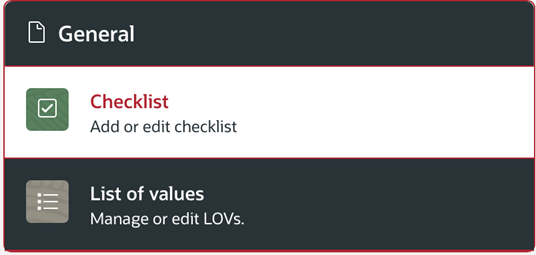
Once you have gone into Admin > General > LOV, you will be taken to the menu as shown below. Below are some examples of LOVs; these LOVs used for Asset Observations.
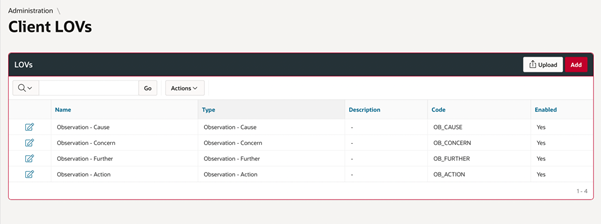
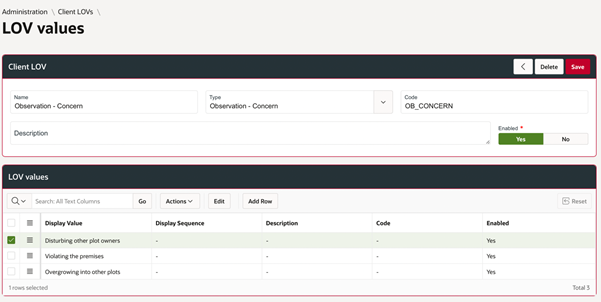
Click ‘add’ to create a List of Values. LOV ‘types’ are prebuilt into the system. Create an LOV, and then click on the edit button to customise the LOV in more detail. Add the name, type and code (please refer to other guides to find the specific codes for LOVs that you want to add). At the very bottom of the screen, you will need to add list of values. This list of values will be all the options for the Value, you can add as many as you need by clicking on ‘Add row’:
Importing LOVs
Uploading LOVs in Bulk
If you wish to import these List of Values in bulk instead of configuring them manually, please follow the instructions listed below:
Administration > General > List of Values > Upload

Here, you can view previously upload LOV’s. If you require to upload, then please use the download to get access to the LOV template.
After downloading you will need to enter the required fields.
Was this article helpful?
That’s Great!
Thank you for your feedback
Sorry! We couldn't be helpful
Thank you for your feedback
Feedback sent
We appreciate your effort and will try to fix the article