Introduction
About this Document
This document explains how to use Repeater Fields. A Repeater Field lets submitters enter multiple records of a similar type within a single form, such as several contacts, items, or addresses.
Document Contents
Repeater Field Component
About repeater fields
Repeater Fields allows customers to add multiple answers for a given question. This means that users can avoid creating repeat questions to capture the same information.
We only recommend using one repeater field per form where possible.
Creating repeater fields
To create a new repeater field, navigate to Administration > General > Plugin > Repeater Fields.
A list of configured repeater fields is presented. Select add to create a new repeater field. Provide the new repeater field with a name and a description.
Once added a new repeater fields section will appear. New repeater options can be added from here.
Each repeater option needs a name, a code and an item type. A repeater option can also be set to required and can be disabled if needed.
The current item types supported on the repeater fields are:
- Textfield
- Textarea
- Select list
- Radio group
- Check box
- Date picker
Unlike the standard date picker, this date picker can only restrict the selectable by year. The min and max values work as following:
- Min – the number of years in the past that the customer can select
- Max – the number of years into the future the customer can select.
For Select List, Radio Group, and Check Box Items, the selectable value and its code. This need to be provided in the format: VALUE;KEY. Each option needs to be separated by a comma. See the example below.
ACCOUNTING;10,RESEARCH;20,SALES;30,OPERATIONS;40
Repeater fields in forms
Create a new component item with the component set to repeater field.
Under the advanced section select the appropriate repeater field, the configured repeater options will display below.
Double click on each repeater option so that it moves in the right-hand column. These repeater options will be displayed to the customer. All other fields will not be shown.
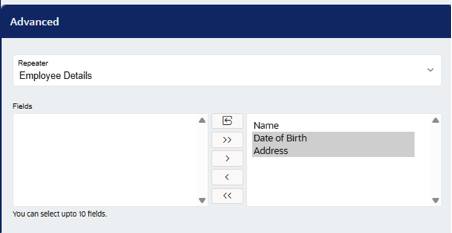
Please note: Only 10 repeater option can be selected at a time.
Was this article helpful?
That’s Great!
Thank you for your feedback
Sorry! We couldn't be helpful
Thank you for your feedback
Feedback sent
We appreciate your effort and will try to fix the article