Introduction
About this Guide:
This guide has been written to help form builders understand Advanced Postcode Pickers. Here, I will give an overview of what this component does, and an explanation of every configurable option and their use cases.
What is an Advanced Postcode Picker?
The advanced postcode picker allows submitters to search a postcode, and then select their intended address from a list of addresses with this postcode. Also, the advanced postcode picker offers the possibility for submitters to add their own address in as a location, which creates a temporary address.
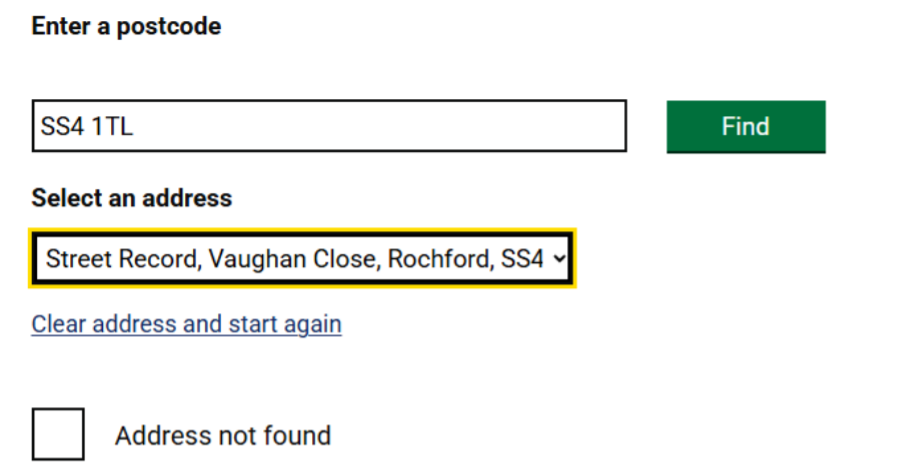
Prerequisite – Add Manual Address
The Advanced Postcode Pickers ‘address not found’ option can be enabled / disabled by going to Administration > Service Request and Case > Options. By clicking 'No' under 'add manual address' you disable this feature and provide a message for customers who click on the 'Address not found' option shown above.

The advanced postcode picker is limited to one component per page.
Configuration Options
Primary
Setting the 'Primary' box to Yes will Place the location of this postcode picker into the 'Location' subheading of the SR, instead of the 'Information' subheading, where other form answers are. Setting the Primary box to 'No' will place the location of the SR in the SR's summary, instead of the SR's location.
Below is an example of an SR where a postcode picker is set to primary. Please note that only one advanced postcode picker can be set to Primary per form.

Advanced:
Default to Home Address (Web Only)
This setting, if enabled, will automatically fill the postcode picker with the 'home address' of the submitter. If a home address is not configured for the submitter, it will leave the postcode picker blank.
Show only council location
If enabled, only properties within the council's boundaries will be selectable for the submitter.
BLPU Classification
If any BLPU classification is selected (sent to the right hand area) the selectable properties will be limited to their BLPU classifications, which can be configured under Administration > Location. For example, in the below configuration, only the Residential BLPU classifications can be selected.
Note - To access the BLPU section in Administraion, your account must have the BLPU access ticked on one or more of your access roles. If you cannot see this option, please contact isupport@abavus.co.uk
Location within boundary
Similarly to 'show only council location' , only properties within the boundaries that you select (selectable in the box below this option) will be shown to the submitter. Boundaries can be configured via Administration > Location.
Select boundary area
Here, if 'location within boundary is enabled, the configured boundaries will be able to be selected. This is only enabled if the boundary is sent to the right hand area.
Boundary message
If 'location within boundary is enabled, and a location outside of the boundary is selected, the message written in this box will display as a pop-up to the submitter.
Validations
is Required
If this is enabled, the postcode picker must have an answer in order for the submitter to proceed to the next page.
Validation Type
This is more often used for textfields and textareas, and do not necessarily apply to advanced postcode pickers.
Error Message
This is the message that will appear when the submitter attempts to go to the next page without entering any information into the postcode picker.
Note:
If a primary postcode picker appears before a non-primary postcode picker on a form, the non-primary picker will automatically pre-populate with the address selected in the primary picker.
If the non-primary location picker appears before the primary location picker, this pre-population will not occur, and the submitter can select the address manually at that point.
If you have any other questions regarding postcode pickers and it's use cases, please contact isupport@abavus.co.uk.
Was this article helpful?
That’s Great!
Thank you for your feedback
Sorry! We couldn't be helpful
Thank you for your feedback
Feedback sent
We appreciate your effort and will try to fix the article