Why Aren’t My Rules Running?
Rules depend on specific configuration, needing certain conditions to be met, as well as a trigger action, to fire.
If one of these configurable settings are not correct, the rule will not fire. So, what are the most common mistakes made when creating rules?
Checking the Rule Option
Firstly, check the rule’s option. This is the event that will make the rule check if it’s conditions are met.
For example, if the rule’s condition is ‘Service – Added’, the rule will check for conditions when a Service Request is submitted. This rule will not fire under any other circumstance.

Checking ‘Match Conditions’ Setting
Next, check the ‘Match Conditions’ setting. If this is set to ‘Any’ then, if at least one condition is met, the rule will fire. However, if this is set to ‘All’ (as default), then all the conditions must be met before the rule can fire.
Is the Rule Active and in its Date Range?
A commonly overlooked configuration error is that the rule is disabled. Sometimes, after testing and configuration, the rule is not activated, so a quick check can rule out this possibility.
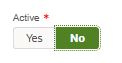
Also, if a rule’s end date is in the past, or it’s start date is in the future, the rule will not fire.


Checking Conditions
This is the most common configuration issue with rules. Unless configured otherwise, all conditions must be met for a rule to trigger.
Click ‘edit’ on each of the conditions and ensure that the SR, Task or Contract satisfies the conditions. For example, if a condition for the rule is that an SR must be submitted in a certain area, check the boundaries for the area against the SR.
Mapping the Process to the Form
For Service-related rules to fire, the rule’s process must be configured against the form the SR is on.
For example, since this form has the ‘Grants’ process configured, only rules in the ‘Grants’ process will run on these SRs:
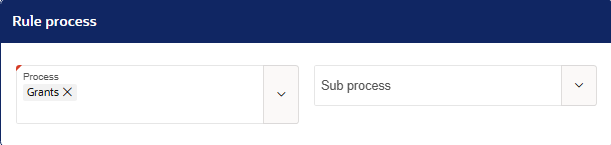

If a sub process is configured against the form, the rule must have the sub process configured against it to trigger.
Feedback Loops
Rules will not fire if the rule’s action will trigger the same rule. This is to prevent feedback loops where rules trigger themselves repeatedly, causing unnecessary strain on the system.
For example, if the following is configured:
- Rule Action is to set an SR to Closed
- Rule Condition is that the SR is closed
- Rule Option is ‘Service – Status Changed’
The rule will not run, as this scenario will cause a feedback loop.
If you have checked each of the reasons in this document, and you are still unsure why your rule is not running, please contact isupport@abavus.co.uk
Was this article helpful?
That’s Great!
Thank you for your feedback
Sorry! We couldn't be helpful
Thank you for your feedback
Feedback sent
We appreciate your effort and will try to fix the article