Introduction
About this Document
This document explains how to set up regular expression validation for form items, including some Regex examples for commonly needed text validations.
Regular expressions (regex) are patterns used to check whether text is in the format you expect. They are commonly used to validate user input such as email addresses, phone numbers, dates, and passwords before the data is accepted or stored.
Document Contents
Regular Expressions
Configuring Validation
To enable Regex validation, open the form item configuration and navigate to the validations section. Set the validation type to “Regular Expression”.
Once selected, enter the required regular expression into the Regular expression field.
An example of this configuration is shown below.
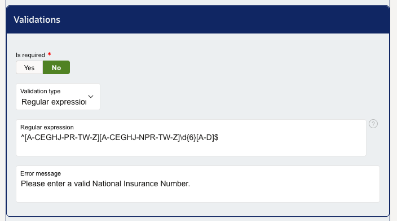
An error message must also be provided. This will be displayed to the user when their input does not meet the defined validation criteria.
This error displays as:

Interactions with Required Fields
Regular expressions work with the “Is Required?” toggle on text-fields and text-areas in the following ways.
Is a Required Field
An input is required to continue through the form
The input must match the configured regular expression
Not a Required Field
No input is required to continue through the form
If an input is provided, it must match the configured regular expression
Testing Regular Expression
We recommend that all regex is tested on one of the following websites to ensure that your inputs are validated correctly.
Please note: If the page does not progress when a regex is set on a form item then it indicates an issue with the Regex itself.
Regex Examples
UK Postcode Validation
This Regex is used to validate that an inputted postcode is in the expected format.
^([A-Z]{1,2}\d[A-Z\d]? ?\d[A-Z]{2}|GIR ?0A{2})$
National Insurance Number Validation
This Regex is used to validate that an inputted NI number is in the expected format.
^[A-CEGHJ-PR-TW-Z][A-CEGHJ-NPR-TW-Z]\d{6}[A-D]$
UK Mobile Number Validation
This Regex is used to validate that an inputted UK mobile number is in the expected format.
^(((\+44\s?\d{4}|\(?0\d{4}\)?)\s?\d{3}\s?\d{3})|((\+44\s?\d{3}|\(?0\d{3}\)?)\s?\d{3}\s?\d{4})|((\+44\s?\d{2}|\(?0\d{2}\)?)\s?\d{4}\s?\d{4}))(\s?\#(\d{4}|\d{3}))?$
Was this article helpful?
That’s Great!
Thank you for your feedback
Sorry! We couldn't be helpful
Thank you for your feedback
Feedback sent
We appreciate your effort and will try to fix the article