Introduction
About MCS
My Council Services (MCS) helps councils manage services from a customer’s first contact through to completing work and reporting results. It connects customer access channels, staff tools and operational work through shared records and workflows.
About this guide
This guide introduces the platform’s key terms and capabilities. It covers:
- How customers and staff access services.
- How information, forms, workflows, and automation support service delivery.
- Access controls, cloud delivery and reporting.
Use this guide as a starting point for understanding MCS and as a reference for its terminology.
Document Contents
- Introduction
- Key terms and definitions
- What you can do with the platform
- Access channels
- Governance, security, and cloud delivery
- Transactions, forms, and workflow
- Example workflow: dog-fouling request
Key terms and definitions
Getting Started
Term | Definition |
My Council Services (MCS) | A system that helps councils manage services, from a customer’s first contact through to completing work and reporting the results. |
Cloud-based | Describes software or services that run on remote servers and are accessed via the internet, rather than relying on your own computer to run the system and store its information. |
Access channel | A way of using MCS, such as a website, mobile application, or staff portal. |
Customer portal | The website residents use to access services, complete forms, make payments, and track requests |
Administration portal | The staff area used to manage requests, set up services, oversee workflows, and monitor activity. |
Service desk | The area where staff can review incoming requests and arrange any action needed. Service > Options > Service Desk. |
Customer Relationship Management (CRM) | Tools for keeping customer information and a history of interaction together, helping staff manage enquiries, requests, and ongoing cases. |
Service request (SR) | A record of something a customer has asked the council to do or investigate via a form. |
Records and information
Term | Definition |
Single-view model | A way of connecting service information through shared records for people, addresses, assets, and organisations. |
Person record | Information about a person, including their identity, contact information, communication preferences, and service activity. |
Address record | Shared location information that can link customers, organisations, assets, and service activity. |
Asset | A physical or digital item the council records and manages, along with its location, condition or status, history, and related works. |
Organisation record | Information about a business or other organisation, including contacts, addresses, and linked service activity. |
Metadata | Shared information used to link records and activity across the system. |
Requests and workflow
Term | Definition |
Form | Set of questions used to collect the information needed for a service. |
Workflow | The connected steps a request follows, from submission through to completion. |
Status | The current stage of a request or task. |
Transition | Controls how requests or tasks move from one status to another. |
Automatic rule | An instruction that makes the system take an action when a particular event or condition occurs. |
Owner | The person responsible or a request or task. |
Priority | How urgently a request or task needs attention. |
Service Level Agreement (SLA) | An agreed service target against which progress or completion can be monitored. |
Task or work order | A job created and assigned so that operational work can be carried out. |
Parent request | The original service request to which a task or other work is linked. |
Outcome | The recorded result of a request or task. |
Escalation | Raising overdue or unresolved work for further attention. |
Audit trail | A recorded history of actions and updates, showing what happened during a process. |
Operational work
Term | Definition |
Reactive work | Work carried out in response to a reported issue. |
Scheduled work | Planned work that happens on a specified date or repeats at an agreed frequency. |
Operative | A worker who carries out operational tasks, such as repairs, inspections, or ground maintenance. |
Prerequisite check | A check that must be completed before work can begin, such as an equipment inspection. |
Access, connections, and reporting
Term | Definition |
Role-Based-Access Control (RBAC) | Permissions that determine what someone can see and do based on their given role. |
Integration | A connection that allows MCS to exchange information with another system. |
Application Programming Interface (API) | A defined way for one software system to request information or actions from another. In simple terms, it allows different systems to “talk” to each other. |
Dashboard | A quick overview of service information, such as request statuses, priorities, and outcomes. |
Service export | A feature for extracting detailed application data for use in other reporting or analysis tools, either manually or on a schedule. |
Custom report | A report set up to answer questions about a particular service or management need. |
What you can do with the platform
Access services and manage requests
- Customers can use web and mobile channels to access services themselves.
- Staff can use customer relationship management (CRM), Service Desk and case-management tools to manage requests.
Keep information connected and automate processes
- Use central records for people, addresses, assets and organisations.
- Set up forms, statuses and rules to control how requests progress and automate workflow steps.
Plan and carry out operational work
- Use MobileOps to carry out work in response to reported issues (reactive work) and planned tasks (scheduled work).
Connect systems and review activity
- Connect MCS with back-office systems, financial services and identity services.
- Use dashboards, data exports and analytical reports to review service activity.
Access channels
MCS presents the appropriate experience to each audience while keeping activity connected to the same underlying data and workflow. Residents can use self-service channels, staff can manage requests through the Administration Portal, and operational teams can receive and complete work through MobileOps.
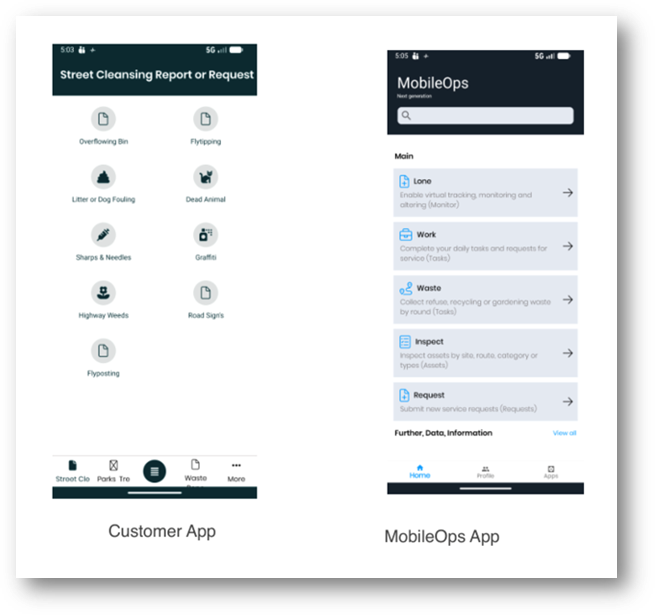
Customer and MobileOps Applications
The customer application allows residents to submit and monitor requests from a smartphone. MobileOps gives operational users access to assigned work, inspections, service information and completion forms while working in the field.
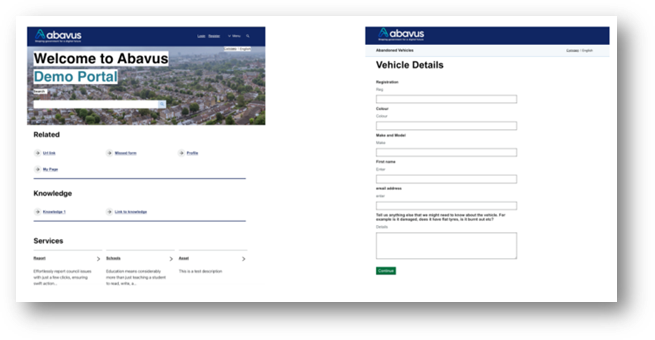
Customer Portal
The web-based Customer Portal provides access to online services, forms, payments and request tracking. It can be configured to reflect the council’s service catalogue and customer journey.
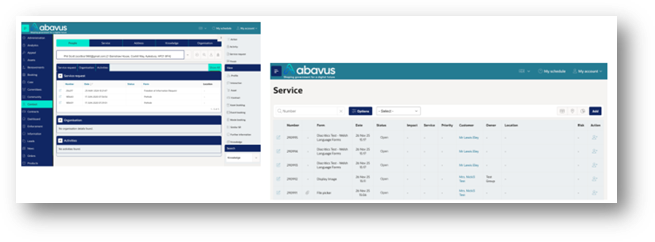
Administration Portal
The Administration Portal provides staff with the tools required to review and manage service requests, configure services, oversee workflows and monitor operational performance. Access is governed by role-based permissions.
Governance, security, and cloud delivery
MCS uses granular Role-Based Access Control (RBAC) so each user sees the functions and information relevant to their responsibilities. Permissions can be applied across system areas, modules, configuration options and individual data sets, supporting separation of duties and controlled administration.
Cloud platform principles
Deliver services through one connected platform
- Bring service delivery together for residents, administrators and operational teams.
- Reduce separate forms, disconnected records and repeated processing by using a common platform.
Protect information and automate work
- Store data securely, check users’ identities when they sign in (authentication), and automate workflow steps.
Expand services and connect systems
- Support more teams and service areas as needs grow.
- Use application programming interfaces (APIs) and other system connections (integrations) to exchange information with external systems, either as activity happens or on a schedule.
Transactions, forms, and workflow
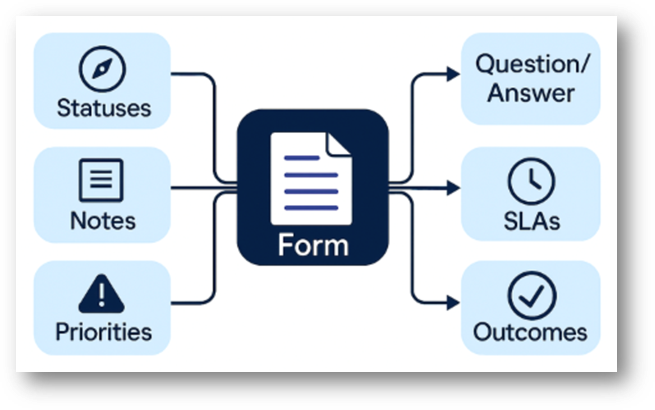
A service in MCS is configured through a catalogue, form and page structure. Statuses and transitions control how the resulting transaction progresses, while automation rules respond to events and apply the required business logic.
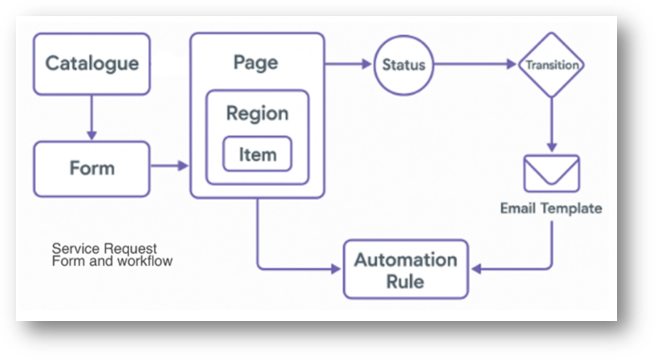
Workflow decisions can use information held on the request, including answers, status, notes, priority, service level and outcome. This allows a service to follow different routes without staff manually repeating the same administrative steps.
Typical automated actions
Routing and prioritisation
- Assign requests to the right owner, or reassign them when needed
- Set the priority and Service Level Agreement (SLA)
Work management
- Create linked tasks or work orders
- Update the parent request automatically when the related operational work is completed
Communication
- Send acknowledgements, progress updates and completion notifications
Monitoring and reporting
- Escalate overdue or unresolved work
- Feed data into operational and performance reporting
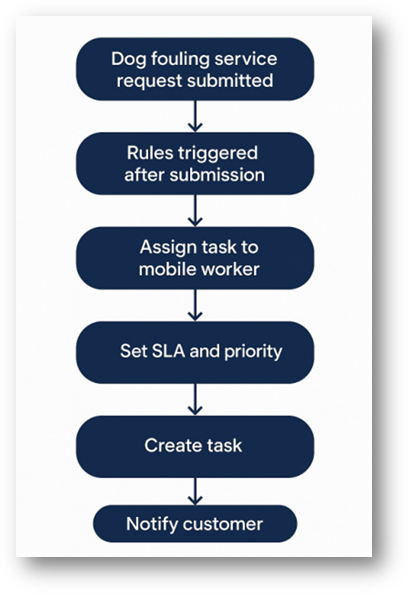
Example workflow: dog-fouling request
Stage | What MCS can do |
1. Submission | Create the service request and run rules based on the answers provided. |
2. Triage | Set ownership, service level and priority using configured conditions. |
3. Operational work | Create and assign a linked task to the appropriate mobile worker. |
4. Completion | Capture the task outcome and update the parent service request. |
5. Communication | Notify the customer at relevant stages and retain a complete audit trail. |
Was this article helpful?
That’s Great!
Thank you for your feedback
Sorry! We couldn't be helpful
Thank you for your feedback
Feedback sent
We appreciate your effort and will try to fix the article