Introduction
About this guide
The Data Lakes solution provides a flexible and configurable way to automatically export transactional data from core system modules into a secure S3 bucket. This enables organisations to create structured, repeatable data feeds for reporting, analytics, and integration with tools such as Power BI.
By supporting configurable data selection, scheduling, and notifications, this solution reduces manual effort and ensures reliable, consistent data delivery.
This allows organisations to streamline their data management processes while supporting wider business intelligence and data lake strategies.
Key Points
Some key information about Data Lakes and it’s use case include the following:
1.Support for analytics and reporting – exported data can be used in Power BI, reporting pipelines, and wider data lake solutions.
2.Flexible scheduling – exports can be configured to run daily, weekly, or monthly.
3. Custom export periods – users can define the data range, such as the last 3, 6, or 12 months, or another required time window.
4. Module-level selection – exports can be created for modules such as Service Requests, Assets, Bookings, Contracts, and others.
5. Transactional data selection – related data such as History, Interactions, Notes, Outcomes, Tasks, and Contracts can be included where applicable.
6. Catalogue and form selection – for Service Requests, users can choose the relevant catalogue and forms to include in the export.
7. Secure delivery – export files are sent automatically to the configured S3 bucket.
8. Email notifications – recipients can be notified when the export process is complete and the file is available.
Benefits of using Data Lakes
There are many benefits to using the Data Lakes solution to export data. These include:
- Reducing the need for manual or ad hoc exports.
- Making data available for reporting and analytics more efficiently.
- Supporting ingestion into platforms such as Power BI.
- Maintaining a consistent and repeatable data extraction process.
- Improving data governance, audit readiness, and compliance considerations, including sensitivity and GDPR awareness
Creating a Data Lake Export
Configuring a Data Lake Export on MCS
The export configuration is managed through Administration > Data Lakes.
Go to Administration > Data Lakes.
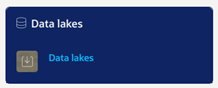
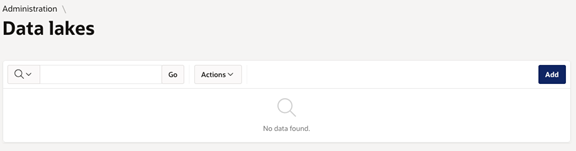
Now, create a new export by clicking ‘add’:
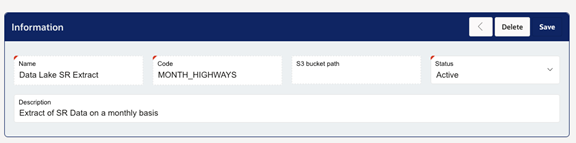
Complete the Information section as shown below, including Name, Code, S3 Bucket Path, Status, and Description.
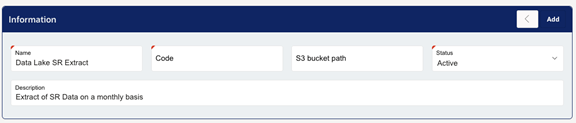
The S3 bucket path may be provided by the support team, or customers may supply their own S3 location for configuration.
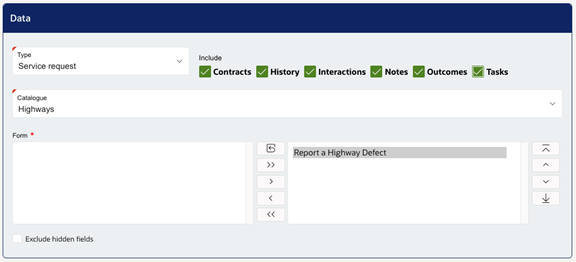
Next, configure the Data section by selecting the following:
Data Types, such as Service Request, Asset, Booking, or Contract.
Catalogue and Forms (where relevant)
Related transactional data (such as Contracts, History, Interactions, Notes, Outcomes, and Tasks)
You may also choose to exclude hidden fields if required.
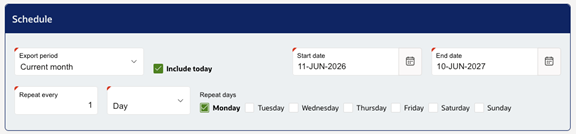
Configure the Schedule section, including Export Period, a tick box to include today where required, Start Date, End Date, Repeat Every/Frequency, Interval Type (Day, Week, or Month), and Repeat Days:
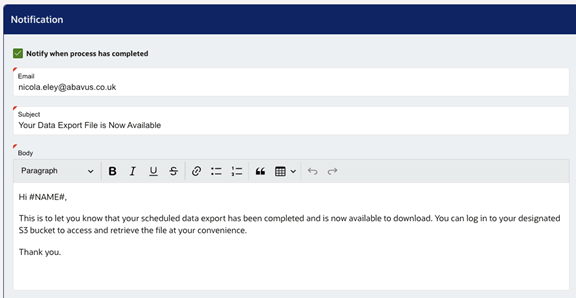
Now, configure notifications by enabling completion alerts, entering one or more email recipients, and defining the email subject and body:
Once you have configured these options, save and activate the export. Review all details, click Save, and ensure the Status is set to Active so the export runs according to the configured schedule.
Managing Data Lake Exports
Managing Existing Data Lakes
To view, edit, or delete existing schedules, go to Administration > Data Lakes.
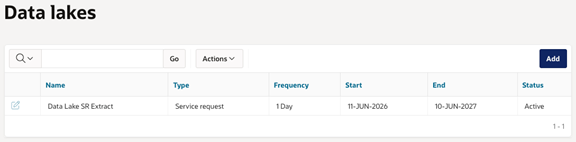
Locate the required export record and use the ‘edit’ option against the record to maintain or amend the configuration as required:
Key Considerations
There are a few important aspects to consider when configuring and using Data Lake exports:
- Data Volume – Use filters and appropriate date ranges to control the amount of data being exported.
- Data Refresh Frequency – Align the export schedule to reporting and business needs.
- Data Governance – Ensure sensitivity, retention, and GDPR considerations are understood and abided by.
- Dependencies / Completeness – Include related datasets where needed to support complete reporting.
- S3 Destination – Confirm that the correct bucket path has been configured before enabling the export.
By using configurable data selection, scheduling, and notifications, administrators can create repeatable and reliable exports that reduce manual effort and support wider business intelligence and data lake solutions.
Was this article helpful?
That’s Great!
Thank you for your feedback
Sorry! We couldn't be helpful
Thank you for your feedback
Feedback sent
We appreciate your effort and will try to fix the article